
For
- Novation Launchpad S
- Novation Launchpad MK2
- Novation Launchpad Mini MK3
- Novation Launchpad X (new, untested)
- Akai APC mini mk1
Each column is a track level. The left and right buttons move the meters left and right. If you want to jump eight tracks at once, the up and down buttons work. Bitwig will mark the monitored tracks with colored triangles, but they're SUPER tiny.
On the APC mini mk1, the faders are associated with the tracks, with the master fader always mapped. If you change tracks, keep in mind you'll have to use "takeover" modes for MIDI. The default one in Bitwig works OK.
Move HardwareVU.bwextension into your Documents/Bitwig Studio/Extensions folder, then plug in your controller. You're done.
This is a beta, so expect a rough edge or two. If you hit one, let me know.
Finding the right folder is the most annoying part, so here's a short guide.
Move the file into the Extensions folder
Press Windows + R, paste shell:Personal\Bitwig Studio\Extensions and press Enter.
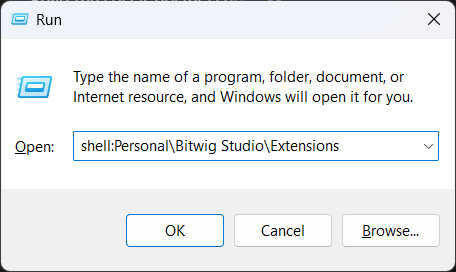
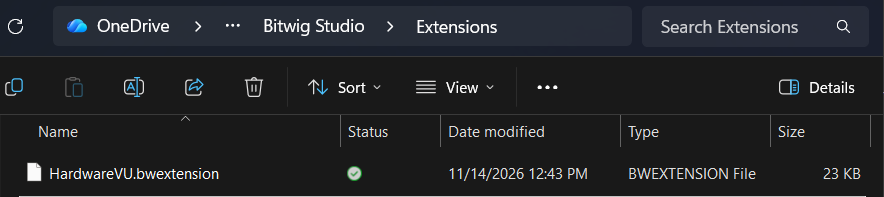
Drag HardwareVU.bwextension from your Downloads into the window that opens.
In Finder, press Shift + Cmd + G, paste ~/Documents/Bitwig Studio/Extensions and press Return.
Drag HardwareVU.bwextension from your Downloads into the window that opens.
Plug in your controller
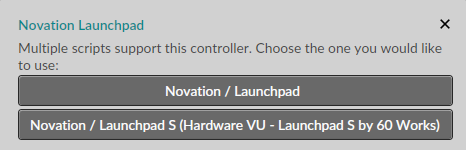
Bitwig finds it on its own. If it asks which script to use, choose the one that says Hardware VU.
The controller doesn't light up
Restart Bitwig. Still nothing? Open Settings → Controllers → Add Controller, pick your controller's maker, then Hardware VU for your model, and choose its ports.
Launchpad Mini MK3 or Launchpad X on Windows
It shows two pairs of ports. Use the pair starting MIDIIN2 / MIDIOUT2, not the plain LPMiniMK3 MIDI or LPX MIDI.
Questions? Email dave@60works.com
Free under the MIT license, which is inside the download. Take it apart, change it, share it.